Your Linux Server Is Lying to You (And 11 Other Things They Don't Teach in Tutorials)
Also onpreet-jain.hashnode.dev/your-linux-server-is-lying-to-you
So I got this assignment: explore the Linux filesystem. Go deep. Find interesting things. My first instinct was to open a tutorial, run a few commands, screenshot them, done. But then I actually started reading files — real files, on a real running system — and fell into one of the most fascinating rabbit holes I've had in a while.
Turns out Linux — the same OS running your Docker containers, is full of weird, brilliant, occasionally terrifying design decisions that nobody explains in tutorials. They just teach you ls, cd, mkdir, and call it a day.
This isn't that. This is what happens when you actually look under the hood.
1. Linux Promised Your App 1GB of RAM. It Was Lying.
Let's start with something that'll mess with your head a little.
When your Node.js or Python app calls malloc() — or when JavaScript's runtime allocates memory behind the scenes — and asks the kernel for, say, 1GB of RAM, the kernel says "Sure, here you go." Immediately. Without actually giving you any RAM.
This is called memory overcommit, and it's controlled by a single file:
cat /proc/sys/vm/overcommit_memory
# 0
Three values. Three completely different philosophies about honesty:
0 (default) — The kernel makes a "best guess" and lies optimistically. Your
malloc(1GB)succeeds even if only 400MB is free. Memory is only actually allocated when your code first writes to each page.1 — The kernel always says yes, no matter what. You can
malloc()ten times your physical RAM. Redis actually recommends this mode. The catch? If you actually try to use all that memory, the OOM Killer wakes up and starts executing processes.2 — The kernel is honest.
malloc()can fail. Used in financial systems where a crash is worse than a slow allocation.
The reason mode 0 exists is actually elegant. When you fork() a process — which is how servers spawn workers — the child doesn't get a copy of the parent's memory. It gets a copy of the page table, a map saying "these virtual addresses point to these physical pages." Both parent and child share the same physical pages, marked read-only. Only when one of them writes to a page does the kernel make a private copy. This is called Copy-on-Write, and it's why spawning 100 worker processes on a Node cluster is cheap. You're sharing, not copying.
Here's the wild part — I measured this live:
mmap(256MB) returned in:         0.027ms   ← no RAM allocated
65,536 page faults triggered in: 499ms
Per page fault:                  7.6 microseconds
The promise is free. The delivery costs 7.6 microseconds per page.
2. /proc Is Not a Folder. It's the Kernel Talking to You.
Here's something that changes how you think about Linux entirely: /proc doesn't exist on your disk. Not even a single byte of it. It's a virtual filesystem the kernel generates live, on every single read, from its internal data structures.

Open a terminal and try:
cat /proc/self/statusThat's your current shell process, right now, telling you its PID, memory usage, CPU time, and security capabilities — all generated by the kernel in real-time as you read the "file." Nothing was stored. The kernel fabricated it the moment you asked.
Every running process gets its own directory under /proc/[pid]/. Inside:
cmdline— the exact command used to start it (whatpsreads)fd/— symlinks to every open file descriptormaps— the complete memory layout with permissionsenviron— every environment variable it inherited
The fd/ directory is particularly interesting. When you list it, you see things like:
0 -> pipe:[4]     (stdin)
1 -> pipe:[5]     (stdout)
3 -> /etc/passwd  (this process is reading your user database right now)
You can see exactly what any process is doing, in real time, without installing anything.
There's also a forensics trick hiding here. If malware runs and immediately deletes its own binary file, the process keeps running — Linux only deletes a file when its link count reaches zero and no process has it open. But /proc/[pid]/exe still points to that deleted binary. You can even copy it back:
cp /proc/1234/exe /tmp/recovered-malwareThe file is "deleted" from the filesystem, but the kernel holds the inode alive. Incident responders use exactly this technique.
3. Your "Free" RAM Is Not What You Think
Run free -h on any Linux server that's been running for a few hours and you'll see something alarming: almost no free memory. Should you panic?
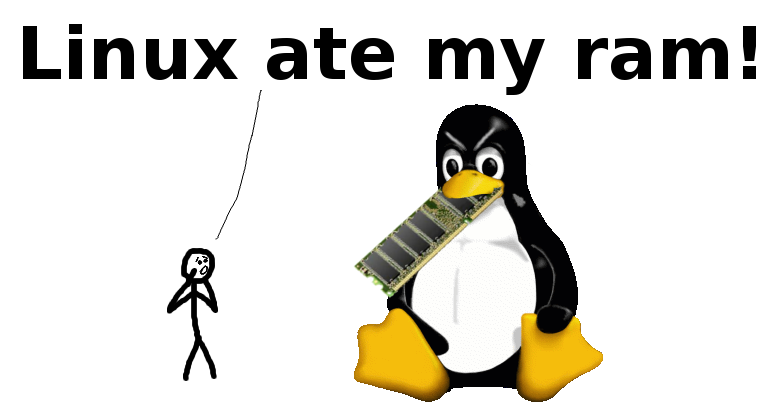
MemTotal:     16GB
MemFree:      200MB   ← "is my server dying??"
MemAvailable: 12GB    ← "oh, we're fine"
Linux aggressively uses all your "free" RAM as a page cache — an in-memory buffer of recently read files. Every file you open, every library your app loads, every config file your database reads — it gets cached in RAM. Next time any process reads the same file, the kernel serves it from RAM instead of disk.
This memory isn't "used" in any real sense. The moment your application needs RAM, the kernel evicts page cache entries to make room. Zero cost — unlike swap, which hits disk.
The deeper magic is mmap(). When nginx serves a static file, it doesn't read it into a buffer and then write it to the socket. That would copy the data twice. Instead, nginx calls sendfile(), which moves data from the page cache directly to the socket buffer — nginx never touches the bytes. This is why it can serve gigabytes per second from a single worker process.
Same idea applies to shared libraries. /usr/lib/x86_64-linux-gnu/libc.so.6 — the C standard library used by practically every program — exists once in the page cache. 200 processes all using libc: 200 virtual memory mappings, one physical copy. Running many processes of the same type is far cheaper than you'd expect.
4. How Node.js Handles 100,000 Connections (And Why select() Couldn't)
This one matters directly to every backend developer here.
The old way of watching multiple network connections was select() — a syscall from 1983. Pass in a list of file descriptors, the kernel scans all of them, tells you which have data. Works fine for 10 connections. For 10,000? The kernel scans 10,000 fds on every single call. O(n) complexity. Server gets slower as connections grow.
poll() in 1997 removed the 1,024 connection limit. Same O(n) problem.
Then in 2002, Linux got epoll. Completely different approach:
Create a single epoll interest list (
epoll_create)Register file descriptors once (
epoll_ctl) — kernel marks them internallyCall
epoll_wait— kernel returns only the fds that are ready
O(1) per event. Doesn't matter if you're watching 10 connections or 100,000. 99,999 idle connections consume zero CPU — your process is sleeping in epoll_wait, and the kernel only wakes it when there's actual work.
This is the engine inside Node.js's event loop (via libuv). It's inside nginx, Redis, and Go's net package. "Single-threaded Node.js handles thousands of connections" isn't JavaScript magic — it's a 2002 Linux kernel feature. I created a real epoll instance while exploring and watched it appear in /proc/self/fd/ as anon_inode:[eventpoll]. A file descriptor, like everything else in Linux.

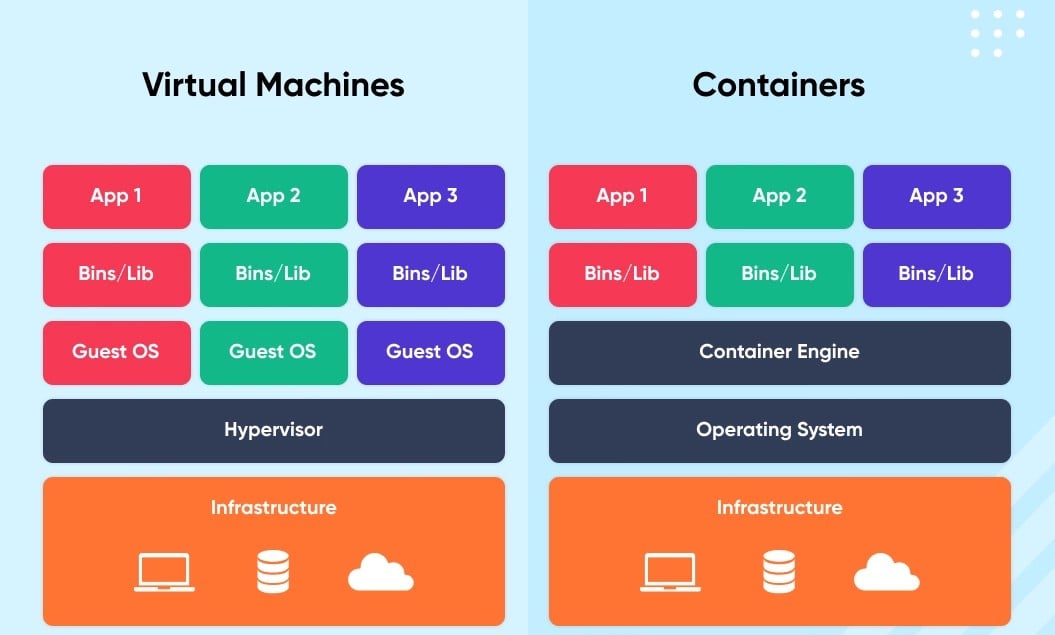
5. Docker Is Not a Virtual Machine. It's Three Kernel Features With a Nice UI.
A lot of developers use Docker every day without knowing this: there is no hypervisor. Docker containers don't emulate hardware. A container is a regular Linux process with three kernel features applied to it:
1. Namespaces — isolation. Each container gets its own network stack, its own process tree (thinks it's PID 1), its own filesystem view, its own hostname.
2. cgroups — resource limits. The kernel enforces how much CPU, RAM, and disk I/O the container can use. I read the actual cgroup config:
cpu.cfs_period_us: 100000    ← 100ms scheduling period
cpu.cfs_quota_us: -1          ← no CPU cap on this machine
memory.limit_in_bytes: ~9GB   ← RAM ceiling
Set cfs_quota_us to 50000 and the container gets at most 50% of one CPU core — hard enforced by the kernel scheduler. No app-level throttling needed.
3. OverlayFS — layered storage. Docker images are stacked read-only layers. Your writable layer sits on top. Modify /etc/hosts inside a container and the kernel copies just that file to your writable layer, modifies your copy, serves the merged view. The base layer is untouched. Every container using the same image is unaffected.
Want to prove namespaces exist?
ls -la /proc/self/ns/
# net -> net:[1]
# pid -> pid:[4]
Two processes with the same net inode share a network stack. Different inode — isolated. Docker creates new namespaces. You can see the boundaries right there in /proc.
6. The Shared Library That Doesn't Exist
ldd /usr/bin/ls
    linux-vdso.so.1 (0x00007ec706f52000)   ← try to find this file. Go ahead.
    libselinux.so.1 => /lib/x86_64-linux-gnu/libselinux.so.1
    libc.so.6 => /lib/x86_64-linux-gnu/libc.so.6
linux-vdso.so.1 — search your entire filesystem. It doesn't exist. No file, no inode, no path. The kernel injects it directly into every process's memory at launch time.
Here's why. Certain syscalls are called millions of times per second — gettimeofday(), clock_gettime(). A normal syscall costs ~500 nanoseconds because it has to switch from userspace to kernel space, do the work, and switch back. For a web server logging timestamps on every request, this adds up.
The vDSO (Virtual Dynamic Shared Object) maps a small piece of kernel memory directly into your process's address space. The kernel keeps the current time there, updated continuously. Your process reads it as a function call — no context switch, no kernel involvement. Cost: ~10 nanoseconds. 50× faster.
The kernel also maps it at a random address on every run (ASLR), so attackers can't rely on predicting its location. A performance optimization that's also a security measure. Two birds, one ghost library.
7. kill -9 Is Not a Polite Request
You've used Ctrl+C to kill a process. What actually happened? You sent SIGINT (signal 2) to the process. The terminal driver intercepted the keypress and called kill(pid, SIGINT). If the process wasn't catching it, it terminated.
The one distinction that matters in production:
kill -15 <pid>   # SIGTERM — politely asks the process to stop
kill -9  <pid>   # SIGKILL — the kernel ends it. Immediately. No negotiation.
SIGTERM can be caught. nginx receives SIGTERM and finishes all in-flight requests before shutting down. PostgreSQL flushes its WAL buffer. Your Node app closes database connections. Clean. Safe. Zero data loss.
SIGKILL cannot be caught. Cannot be blocked. Cannot be ignored. The kernel terminates the process between two instructions, wherever it happens to be — mid-database-write, mid-file-flush, mid-transaction. Potential for data corruption is real. Use kill -9 as a last resort, not a first instinct.
And SIGHUP (signal 1)? Originally meant "your terminal disconnected." Today it means: reload your config without restarting. kill -HUP $(cat /var/run/nginx.pid) tells nginx to re-read nginx.conf and open new log files without dropping a single connection. Every daemon that takes configuration seriously uses this pattern.
8. /dev/null Has Siblings, and One of Them Is Designed to Annoy You
Everyone knows /dev/null — the void. Write to it, data disappears. Read from it, you get nothing.

But it has a family:
ls -la /dev/null /dev/zero /dev/full /dev/urandom
crw-rw-rw- 1 root root 1, 3  /dev/null     ← the void
crw-rw-rw- 1 root root 1, 5  /dev/zero     ← infinite zeros
crw-rw-rw- 1 root root 1, 7  /dev/full     ← always "disk full"
crw-rw-rw- 1 root root 1, 9  /dev/urandom  ← cryptographic entropy
/dev/zero reads as an infinite stream of zero bytes. dd if=/dev/zero of=bigfile bs=1M count=100 creates a perfectly blank 100MB file.
/dev/full is the one nobody talks about. Try writing to it:
echo "hello" > /dev/full
# bash: /dev/full: No space left on device
It always reports the disk as full. Every write fails with ENOSPC. This exists purely for testing — if your application doesn't properly check the return value of write(), it silently loses data when a disk fills up. /dev/full lets you test that error path without actually filling a disk. A debugging tool disguised as a filesystem entry.
/dev/urandom is the entropy source that all cryptography depends on. The kernel continuously harvests randomness from hardware timing jitter, network packet arrival times, and other sources of genuine unpredictability — then feeds it through a ChaCha20 CSPRNG. Cryptographically secure, and since Linux 4.8, it never blocks. Old tutorials saying "use /dev/random for crypto" are obsolete.
9. The Permission System Has a Secret Third Layer
You know rwxrwxrwx — owner, group, other. Nine bits. But actually there are twelve permission bits in Unix, and the hidden three cause more confusion than everything else combined.
Setuid (s instead of x in owner position):
ls -la /usr/bin/passwd
-rwsr-xr-x 1 root root /usr/bin/passwd
See that s? When you run passwd to change your password, the process runs as root — because it needs to write to /etc/shadow, which is root-only. But passwd does exactly that one thing and then drops the privilege. Every setuid binary is a potential exploit target if it has any bug, which is why hardened systems keep the list as short as possible.
I found 13 setuid/setgid binaries on this system. Notably, /usr/sbin/unix_chkpwd (the PAM password checker) runs as group shadow, not root. The shadow group has read access to /etc/shadow. This program needs to verify passwords — read access is enough. If it has a buffer overflow, an attacker gets shadow file read access, not a root shell. That's the difference between a bad day and a catastrophic one.
Setgid on directories: New files inherit the directory's group, not the creator's.
mkdir /team-project
chown :developers /team-project
chmod g+s /team-project
Every file anyone creates inside now belongs to developers automatically. No one has to remember to chown.
Sticky bit (t in the other-execute position):
ls -la /tmp
drwxrwxrwt  root root /tmp
/tmp is world-writable — anyone can create files there. The sticky bit means you can only delete files you own. Without it, any user could rm -rf /tmp/* and wipe everyone's temporary files. The t prevents that. One bit. Big consequence.
10. The Environment Variable That Powers Debuggers — and Rootkits
This one is genuinely mind-bending. There's an environment variable that intercepts every function call in every program:
export LD_PRELOAD=/path/to/my.so
./any-program
Your shared library loads before everything else — before libc, before anything. Every malloc(), every fopen(), every connect() call goes through your library first. This is completely legitimate and extremely useful:
faketime: overrides
clock_gettime()to return a fake time. Test "what happens at December 31st, 23:59" without changing your system clock. Used in CI pipelines all the time.valgrind / AddressSanitizer: overrides
mallocandfreeto track every allocation and detect memory leaks.jemalloc / tcmalloc: Facebook and Google replaced glibc's default allocator entirely this way, getting 30–50% memory reduction in production services without recompiling anything.
Now the dark side. Malware uses LD_PRELOAD to override readdir() — making ls hide certain files. Override getdents() — making find skip directories. A rootkit can make itself invisible to every userspace tool because all those tools eventually call libc, and libc is compromised.
Two defences: LD_PRELOAD is silently ignored on setuid binaries and binaries with Linux capabilities. And reading /proc/[pid]/maps directly bypasses any libc hook — the kernel reports truth regardless of what libc is doing. Incident responders who know this can find the injected library even when everything else looks clean.
11. One Line That Replaced a Cron Job, a Startup Script, and a Package Installer

Found this in /usr/lib/tmpfiles.d/tmp.conf:
D /tmp 1777 root root 30dSeven tokens. Here's what this single line does:
D — create this directory if missing, AND clean files older than the age
/tmp — the path
1777 — permissions (
1= sticky bit,777= world-readable/writable/executable)root root — owner and group
30d — remove anything not accessed in 30 days
Before systemd, getting this right required a cron job to clean old files, an rc.local entry to create /tmp if missing, and package scripts to set the sticky bit. Three places to maintain. Three places to break.
Now it's one declarative line. If someone manually removes the sticky bit from /tmp, the next boot fixes it. If /tmp is missing for some reason, it gets recreated with exactly the right permissions. You declare what the filesystem should look like, and the system makes it so.
The same tmpfiles.d system manages /run/credstore — systemd's secret injection directory. Services can receive passwords, API keys, and TLS certificates at startup through a special directory, without those secrets appearing in environment variables (visible in ps), command-line arguments, or logs. Secrets that live only in a tmpfs location that vanishes completely on reboot.
One last thought — and this is the thing I actually walked away with after this exploration. The most interesting documentation on a Linux system isn't man pages. It's /proc. It's /etc. It's the live, running kernel telling you exactly what it's doing right now, in plain text files you can just cat. You just have to know to look.